
In the digital-first financial world, your bank website design & development is not just a virtual brochure. It is your institution’s most valuable branch.
Whether you are a major financial institution, a local credit union, or a new player in the online banking space, your website is the first place customers judge your credibility, explore services, and decide if they trust you with their money.
The problem is that most banking websites still fall short. Outdated interfaces, poor mobile responsiveness, and unclear calls to action can make even the best financial tools hard to find or, worse, push potential customers to a competitor in three seconds flat.
This guide covers everything you need to design a bank website that builds trust, drives conversions, and holds up in 2026.
A great bank website design combines security, speed, accessibility, and clear navigation to help users complete financial actions with confidence. It must work seamlessly across all devices while making banking products easy to understand and use.
The most effective banking websites focus on strong security signals, mobile first design, fast load times, ADA compliance, clear calls to action, and consistent branding that reinforces trust.
Missing even one of these elements creates friction that weakens credibility and drives users toward better designed competitors.
Traditional Bank Website vs Modern Bank Website Design
Before planning your design, understanding the shift from traditional to modern bank website design helps you avoid building the wrong thing.
| Element | Traditional Bank Website | Modern Bank Website |
|---|---|---|
| Homepage | Dense, text-heavy, product-first | Clean, task-focused, user-first |
| Navigation | Deep menu structures | Simplified with search |
| Security signals | Buried in footer | Prominent throughout |
| Mobile experience | Desktop design scaled down | Mobile-first, touch-optimized |
| CTAs | Minimal, generic | Clear, contextual, action-specific |
| Content | Product descriptions | Financial education + product content |
| Support | Phone number only | AI chat, live chat, self-service |
| Load time | 5 to 8 seconds | Under 3 seconds |
| Accessibility | Not prioritized | WCAG 2.1 compliant by default |
| Personalization | None | Dashboard-driven, behavior-based |
The gap between these two columns is where most banks lose customers to neobanks and fintech competitors.
Ready to Build a Bank Website That Converts?
Seahawk designs and develops secure, mobile-first WordPress websites for banks, credit unions, and financial institutions. No contracts. No retainers.
7 Pillars of Effective Bank Website Design
Each pillar below is a ranking factor in its own right and a trust signal to your customers. Treat them as non-negotiable requirements, not optional enhancements.
User-Friendly Navigation and Information Architecture
Visitors land on your homepage looking for specific actions: log in, open an account, apply for a loan. Your navigation should surface these actions with one click from the homepage and use plain-language labels rather than internal product nomenclature.
Studies show users form a visual impression of a website in as little as 0.05 seconds. A navigation structure that feels intuitive at first glance reduces bounce rates and increases the probability that a visitor completes a financial action.
Keep global navigation to five or six top-level items. Surface your most-used tools (loan calculator, rate comparison, branch locator) within the main navigation or a persistent utility bar.
Clear Calls to Action That Guide Users
Every page should direct users to the next logical step. “Open Account,” “Compare Rates,” “Apply Now,” and “Schedule a Consultation” are action-specific CTAs that reduce decision fatigue and increase conversion.
Place your primary CTA above the fold on every product page. Use a secondary CTA for users who need more information before committing. Consistent button styles across pages reinforce that every CTA is clickable and trustworthy.
Bulletproof Security and Trust Signals
Nothing erodes trust faster than doubt about security. Display SSL certificate indicators, multi-factor login options, and fraud alert notifications prominently. Pair these with compliance badges showing your institution meets relevant industry regulations.
Security signals should appear at the point of action, not buried in a footer. A login area without visible security indicators creates hesitation at exactly the moment you need confidence.
Mobile Responsiveness Across All Devices
More than 60% of retail banking traffic comes from mobile devices. Responsive grids, touch-friendly menus, and thumb-zone placement for primary CTAs ensure your site works as well on a phone as it does on a desktop.
Mobile-first design means building for the smallest screen first and enhancing for larger screens, not the other way around. Every feature, including loan calculators, account dashboards, and document uploads, must function on a 375px mobile viewport.
Accessibility and Inclusive UX
ADA-compliant color contrast ratios, keyboard navigation, ARIA labels, and descriptive alt text are not just legal safeguards. They make your site genuinely usable for more people and demonstrate that your institution values all customers equally.
WCAG 2.1 compliance is increasingly enforced in financial services. Non-compliant banking websites face both legal risk and reputational damage. Inclusive design is also better design: accessibility improvements benefit every user, not just those with disabilities.
Performance and Speed
Site speed directly impacts both search rankings and conversion rates. A one-second delay in page load time reduces conversions by 7%. For banking websites where the conversion goal is opening an account or completing a loan application, the cost compounds quickly.
Compress all images, implement lazy loading, use a CDN, and host on infrastructure optimized for both performance and banking-grade security. Target a Time to First Byte (TTFB) under 600ms and a Largest Contentful Paint (LCP) under 2.5 seconds.
Consistent Branding and Visual Credibility
A cohesive color palette, professional imagery, and a tone of voice that reflects your institution’s culture build brand recognition and trust across digital touchpoints. Inconsistency across your website, mobile app, and physical branch materials creates cognitive dissonance that undermines credibility.
Define a design system that governs color, typography, spacing, and component styles across every digital property. Apply it consistently.
Key Trends in Modern Bank Website Design (2026 Edition)
The financial industry is rapidly evolving, and so are expectations for bank website design. Today’s users demand not just functionality but delightful, frictionless digital experiences. Let’s explore the most impactful trends shaping banking websites right now.
Minimalist Layouts With a User-Focused Approach
Gone are the days of cluttered homepages. Clean, minimalist interfaces with generous white space help guide users toward key services while reducing visual noise. Banks are embracing user-focused layouts to improve user experience and promote better engagement.
Smart Chatbots & AI Assistants
Digital-first banks like Monzo and Revolut have embraced AI chat support to provide instant answers, improve customer engagement, and reduce support costs. These assistants are seamlessly embedded in the UI, offering a personal touch that users expect from leading fintechs.
Personalization at Every Step
From suggested financial products based on browsing behavior to personalized dashboards showing recent transactions or loan status—personalization increases user engagement and builds trust. It also keeps visitors on your site longer, which helps with search engine optimization.
Video Content, Animations & Interactive Features
Explainers for mortgages, loans, and credit cards using short video snippets or micro-animations add visual appeal while simplifying complex concepts. These elements engage users and increase the time on site, a critical SEO ranking factor.
Seamless Integration With Financial Tools
Modern banking websites now integrate financial tools like budgeting apps, loan calculators, and credit score trackers. These tools offer relevant information and easy access to self-service options, especially valuable for younger users who prefer DIY banking. To streamline loan processes alongside these features, many institutions also use consumer loan origination software to efficiently manage applications and approvals.
Mobile-First Everything
With more than 70% of users accessing bank websites on mobile devices, it’s no surprise that responsive design is now the default. Everything from navigation to load speed is designed for various devices, ensuring a smooth experience whether your customer is checking balances or applying for a loan.
Accessibility-First Design
Compliant design doesn’t just check boxes; it makes your website more inclusive. Visual contrast, ARIA labels, and screen-reader compatibility signal professionalism and responsibility – essential qualities for any financial institution in today’s digital world.
Trust-Focused Design
Users now expect security to be baked into the website design itself. Trust badges, clear login areas, fraud alerts, and transparent policies help reinforce trust and reduce bounce rates.
Best Bank Website Design Examples [Updated 2026]
If you’re looking for real-world inspiration, these top bank website design examples show what’s possible when creativity meets user-friendly, secure, and conversion-focused design.
Each of these financial institutions brings something unique to the table; be it a modern interface, mobile responsiveness, or exceptional customer engagement tools.
Ally Bank
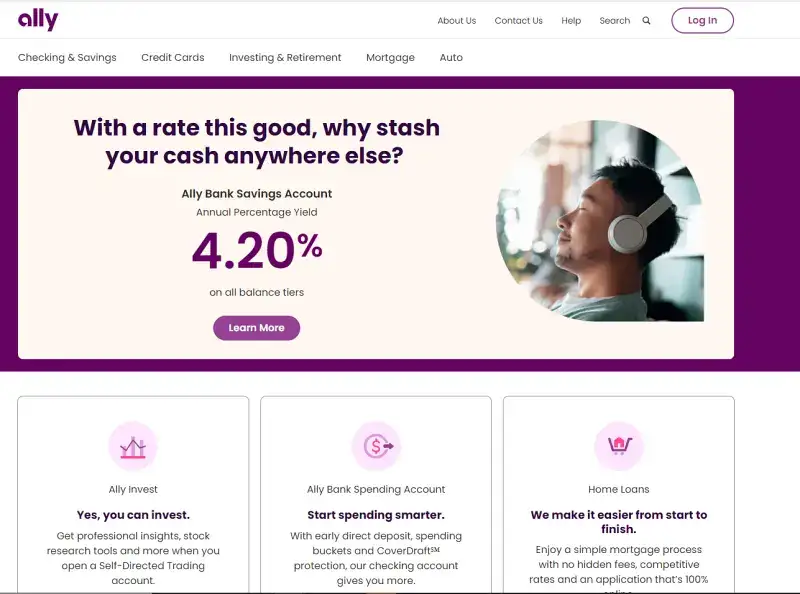
Why it works:
- Clean and modern website design
- Easy navigation with standout CTAs like “Open Account”
- Strong emphasis on mobile devices with responsive layouts
- Smart use of whitespace and branding colors for visual calm
Ally proves that a banking site doesn’t have to look traditional to be trustworthy. The site is built around easy access to core services, and it features sleek animations that improve the user experience without distraction.
What it does well: Mobile-first layout, standout CTAs, smart use of whitespace, fast load times.
Monzo
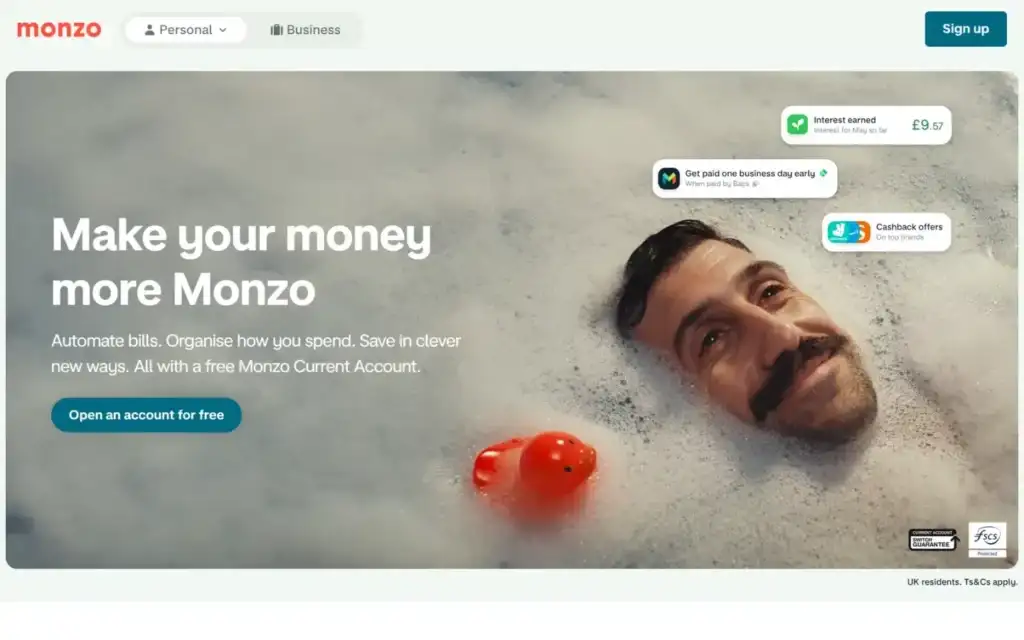
Why it works:
- App-like experience designed for mobile-first users
- Colorful, engaging UI with bold typography
- Smooth transitions and a personal touch in microcopy
- Fast load time and intuitive site architecture
Monzo’s design feels more like a fintech startup than a traditional credit union website, and that’s exactly why it connects with younger users who want financial tools at their fingertips.
What it does well: App-like UX, mobile-optimized, strong brand personality, fast performance.
Chase Bank
Why it works:
- Clear structure with obvious login, product, and support pathways
- Emphasizes security with clear disclosures and protection policies
- Robust financial industry tools like budgeting and account calculators
- Simple, consistent layout optimized for all devices
Chase combines the professionalism of a large financial institution with practical UX decisions that help guide users directly to what they need.
What it does well: Clear navigation structure, security prominence, comprehensive financial tools, device consistency.
Nubank
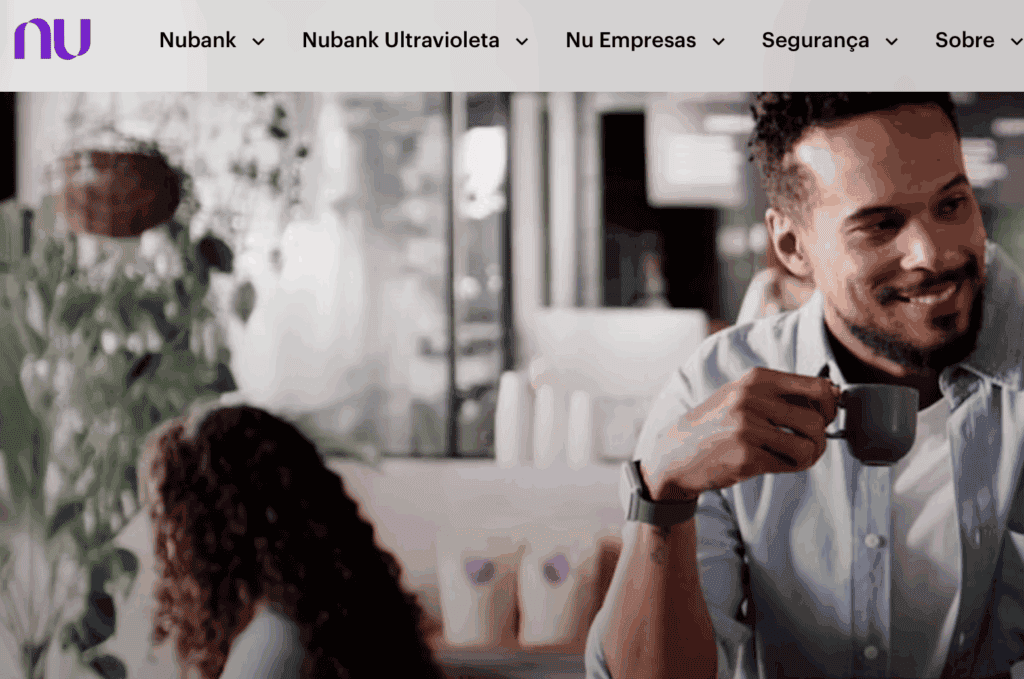
Why it works:
- Gorgeous color palette that reinforces brand identity
- Focus on responsive design and interactive dashboards
- Excellent use of iconography for quick content scanning
- High engagement levels due to personalized content
Nubank’s design is distinctive in banking: colorful, personalized, and genuinely engaging. Iconography-driven scanning, personalized content, and interactive dashboards give the site an energy that traditional banking websites rarely achieve.
What it does well: Strong brand identity, personalization, responsive design, and high engagement indicators.
HSBC
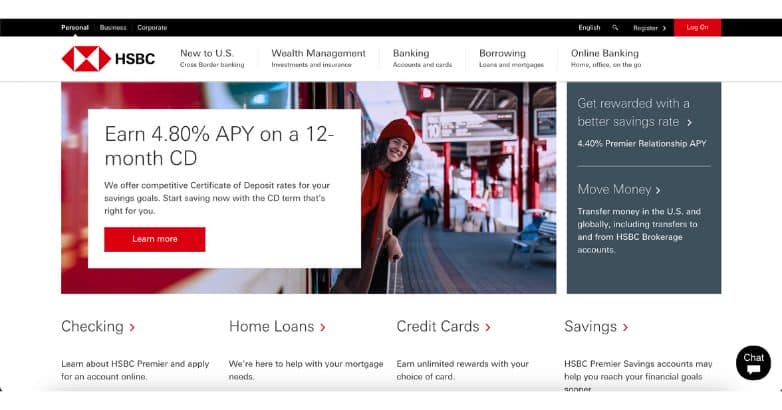
Why it works:
- Global appeal with multi-language support
- Consistent branding across regions
- Clean layout optimized for user-friendly journeys
- Deep integration with financial services portals
HSBC’s website is a masterclass in accessibility and localization, proving that a large banking brand can still feel personal and approachable.
What it does well: Accessibility, localization, consistent global branding, clean layout.
Revolut
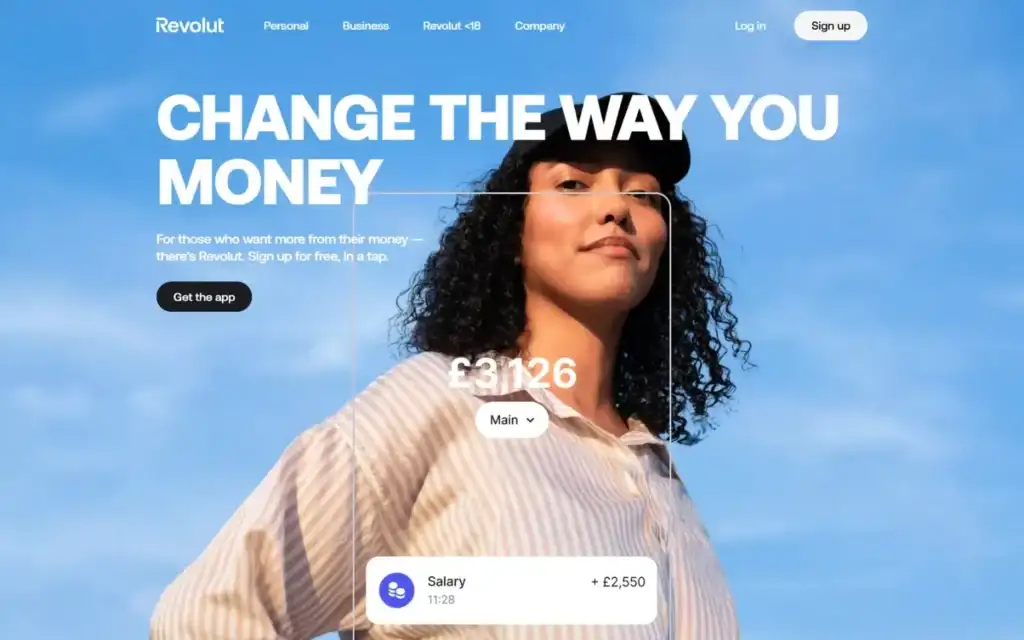
Why it works:
- Sleek, high-tech visuals for a digital-native audience
- Scrolling animations and microinteractions increase user engagement
- Dashboard-style interface allows quick access to features
- Excellent use of trust-building visuals and security cues
Revolut blends modern design with seamless UX for customers who expect both aesthetics and functionality—especially on mobile devices.
What it does well: Modern visual design, microinteractions, trust-building visuals, mobile performance.
Want to build a secure and engaging banking website like these? Partner with a professional web design company that understands the needs of today’s financial brands.
Must-Have Features for a Successful Banking Website
Design without the right features is decoration. These are the functional requirements every banking website must deliver.
Secure Login and Multi-Factor Authentication
Your login area is the most security-sensitive part of your site, and the one customers scrutinize most carefully. Implement MFA, biometric support, device recognition, and visible security indicators at the login point. Any friction here is acceptable because it signals that you take access security seriously.
Online Account Opening and Loan Applications
Customers expect to complete the full account-opening or loan-application journey online without a branch visit. Guided form flows with progress indicators, clear field labels, and inline validation reduce abandonment on high-intent pages.
Personalized Account Dashboards
A dashboard that surfaces recent transactions, product recommendations, payment due dates, and account summaries increases session time and reduces the need for support calls. Personalization at this level also increases cross-sell opportunities for products.
Branch Locator and Contact Integration
GPS-based branch and ATM locators, click-to-call phone numbers, and integrated scheduling tools serve customers who prefer hybrid banking models. These features also signal that your digital presence supports, rather than replaces, human relationships.
Live Chat, AI Chatbots, and 24/7 Support
Real-time support through live chat or AI-driven bots reduces call volume, improves first-contact resolution, and increases customer satisfaction. Modern banking chatbots can handle account inquiries, loan pre-qualification questions, and appointment scheduling without human escalation.
Financial Calculators and Tools
Mortgage calculators, savings estimators, loan comparison tools, and credit score checkers give users self-service answers to the questions they would otherwise call about. These tools also serve as lead-generation tools by capturing information from high-intent users.
Resource Center and Financial Education Content
Publishing educational content on topics like interest rates, credit scores, budgeting, and mortgage processes improves your search rankings, establishes your institution as a trusted authority, and drives organic traffic from users at the top of the financial product consideration funnel.
Common Design Mistakes Banks Should Avoid
Even with the best intentions, many financial institutions fall into common traps that harm user engagement and trust. Here are the top bank website design mistakes to avoid if you want to attract and retain customers:
Over-Cluttered Home Page
Trying to showcase everything at once leads to decision fatigue. Instead, prioritize easy navigation, minimal distractions, and clear calls to action that help guide users to their next step.
Using Too Much Financial Jargon
Technical language can alienate new users. Stick to plain language, especially when explaining financial tools, account options, or fees. Make your site accessible to all levels of knowledge.
Hidden CTAs or Login Buttons
If your login or “Open Account” button isn’t instantly visible, you’re losing leads. Place your primary CTAs in obvious, clickable positions across all devices, especially for mobile friendliness.
Ignoring Mobile Optimization
A site that’s not designed with mobile devices in mind risks losing the majority of your traffic. Embrace responsive design to provide a seamless experience across smartphones, tablets, and desktops.
Failing to Meet ADA Compliance
Overlooking accessibility means excluding users who rely on screen readers or alternative input. ADA-compliant design isn’t just ethical; it’s essential for building trust and legal protection.
How to Design a Bank Website That Converts
Building a successful bank website isn’t just about aesthetics; it’s about creating pathways for users to take meaningful action. Here’s how to design a user-friendly, conversion-optimized platform:
Step 1: Define Your User Journeys
Map the paths your customers take from their first visit to a completed financial action. New account opening, loan application, mortgage inquiry, and support contact are the four most common journeys. Design your navigation, CTAs, and content hierarchy around these specific paths.
Step 2: Choose the Right Technology Stack
WordPress, paired with a managed hosting environment optimized for financial-grade security, provides the flexibility, SEO capability, and plugin ecosystem most banking websites need. It supports mobile-first design, integrates with financial tools and APIs, and offers complete control over security configuration.
Step 3: Work With Designers Who Understand Financial UX
Bank website design has specific requirements that differ from general web design: compliance visibility, trust signal placement, form flow design for financial applications, and security UX. Working with a team experienced in financial services design reduces the risk of getting these wrong.
Step 4: Test With Real Users Before Launch
A/B test your primary CTAs, homepage layouts, and form flows with actual users before the site goes live. User testing in financial services often reveals that customers interpret design elements differently than internal teams expect, particularly around security indicators and fee disclosures.
Bank Website Design Inspiration from Other Industries
Some of the best ideas for bank website design don’t always come from the financial world. Here’s what banks can learn from other sectors:
From eCommerce: Personalized Dashboards
eCommerce platforms excel at tailoring content to users. Banks can replicate this by showing personalized insights, product recommendations, and financial tips on dashboards to increase user engagement.
From SaaS: Streamlined Onboarding
SaaS companies offer slick onboarding flows that guide users through features step by step. Banks can use similar flows for account setup, transaction management, or exploring financial tools.
From Fintech: App-Like Interfaces
Fintech companies lead with app-style UIs optimized for mobile devices and quick access. Traditional banks can adopt these interfaces to make their websites feel more intuitive and modern.
Final Pre-Launch Checklist for Your Bank Website
| Category | Check |
|---|---|
| Security | HTTPS and SSL certificate active and auto-renewing |
| Security | Multi-factor authentication enabled on all login flows |
| Performance | Page load time under 3 seconds on mobile (test with Google PageSpeed) |
| Performance | Images compressed and lazy loading active |
| Legal | Privacy policy, terms of service, and cookie notice in place |
| Legal | All regulatory disclosures visible on relevant product pages |
| Mobile | Site tested on iOS and Android across Chrome and Safari |
| Mobile | All forms functional and submittable on mobile |
| Accessibility | WCAG 2.1 AA compliance verified with automated checker |
| Accessibility | Keyboard navigation functional on all interactive elements |
| SEO | Meta titles and descriptions set on all key pages |
| SEO | XML sitemap submitted to Google Search Console |
| Analytics | Google Analytics or equivalent installed and tracking |
| Functionality | All calculators and financial tools tested end-to-end |
| Functionality | All contact forms and chatbot flows tested |
Conclusion: Build Trust Through Better Bank Website Design
Your bank website is no longer a digital placeholder. It is your most important customer-facing tool and in many cases the primary reason a potential customer chooses your institution or a competitor.
A well-executed bank website design does not just look modern. It provides clear navigation, reinforces your brand identity, builds trust at every interaction, and guides users toward financial decisions that benefit both the customer and the institution.
If you are ready to upgrade or completely transform your bank’s digital presence, Seahawk builds custom WordPress-powered banking websites with enterprise-grade security, mobile-first design, and the SEO infrastructure financial institutions need to compete in 2026.
Frequently Asked Questions About Bank Website Design
What makes a good bank website design?
A good bank website design combines security visibility, clear navigation, mobile-first responsiveness, fast load times, and accessible UX. Every page should guide users toward a specific financial action through clear calls to action, and the site should signal trustworthiness at every interaction through visible security indicators, compliance badges, and transparent fee disclosures.
What features should a bank website have?
A bank website must include secure login with multi-factor authentication, online account opening and loan application flows, personalized account dashboards, branch and ATM locators, live chat or an AI chatbot, financial calculators, and a resource center with educational content. These features cover the full spectrum of customer journeys from first visit through ongoing account management.
What are the most common bank website design mistakes?
The most common mistakes are overcrowded homepages that create decision paralysis, hidden login and CTA buttons, excessive financial jargon that alienates non-expert users, lack of mobile optimization, slow load times, and ADA non-compliance. Each of these directly reduces conversion rates and customer trust.
Should a bank website be built on WordPress?
Yes, for most banks and credit unions, WordPress is an excellent choice. It powers over 43% of all websites globally, has a mature security ecosystem, and offers extensive plugin support for financial tools, SEO, accessibility, and performance optimization. Combined with a managed hosting environment, WordPress provides the flexibility and control most banking websites need without the vendor lock-in of proprietary CMS platforms.
How do I make my bank website ADA-compliant?
ADA compliance for bank websites requires meeting WCAG 2.1 AA standards. This includes color contrast ratios of at least 4.5:1 for body text, keyboard navigation for all interactive elements, ARIA labels on form fields and buttons, descriptive alt text on all images, and screen reader compatibility. Use automated tools like WAVE or Axe to identify compliance gaps, and conduct a manual audit to catch issues automated tools miss.
What are the latest trends in bank website design?
The leading trends in 2026 bank website design are AI-powered chatbots for real-time support, personalized dashboards tailored to individual customer behavior, mobile-first interfaces that feel app-like rather than web-like, minimalist layouts with task-focused navigation, interactive financial tools including calculators and rate estimators, and accessibility-first design as a baseline requirement rather than an afterthought.



