The emergence of AI-powered design and coding platforms is revolutionizing the world of software development. This innovative era fundamentally transforms how developers build applications, with two prominent platforms, Lovable and Cursor, at the forefront of this change. The central debate for many is Lovable vs Cursor, and understanding their distinct approaches is key to making the right choice.
Both platforms actively use artificial intelligence to enhance the development process, but cater to different users and workflows. This guide will provide a comprehensive, unbiased comparison, helping you understand each platform’s unique strengths to make an informed decision for your next project.
Understanding AI-Driven Design and Coding Platforms
AI-driven platforms are more than simple code generators; they are intelligent co-pilots that can assist with various development tasks. These tools offer several key benefits. They can accelerate prototyping by generating boilerplate code in seconds. They also help reduce developers’ cognitive load by automating repetitive tasks, allowing teams to focus on solving complex problems.
These platforms enable a new level of collaboration by bridging the gap between designers, product managers, and engineers. The core difference between tools like Lovable and Cursor lies in their philosophy and the specific problems they aim to solve. This is the central argument in any discussion of Lovable vs Cursor vs AI tools.
Need a Custom WordPress Site for Your AI-Driven Product?
Seahawk builds powerful, scalable WordPress websites tailored for startups, dev tools, and AI platforms.
Deep Dive: Lovable
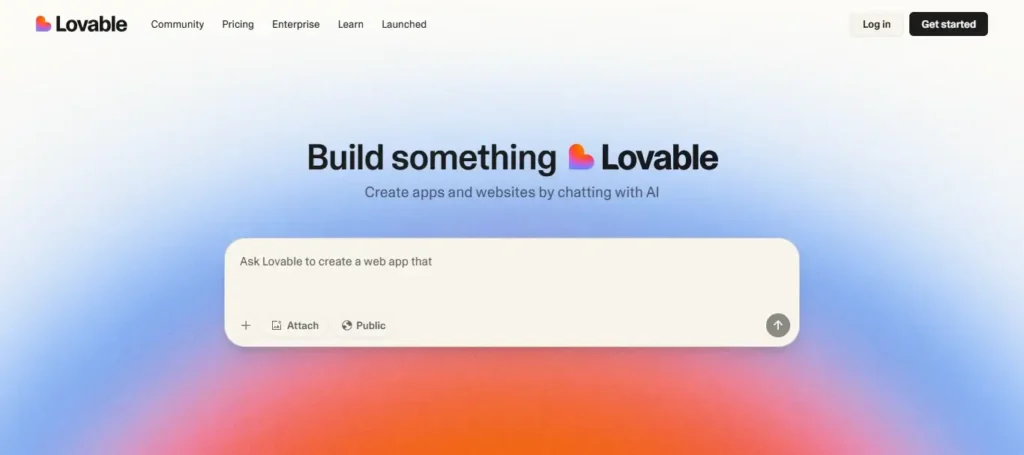
Lovable is a no-code to low-code platform that uses natural language to build and deploy full-stack applications. It’s an AI app builder that turns your ideas into a working application without writing a single line of code.
Core Concept and Target Audience
Lovable’s core concept is to democratize app development. It empowers non-technical founders, product managers, and designers to create functional, production-ready applications. The platform’s natural-language interface allows users to describe their desired application in plain English, from its UI to its database structure.
This conversational approach makes Lovable ideal for rapid prototyping and quickly validating new ideas. It shines when you need an MVP in hours or days, not weeks or months. Many users on Reddit find its power in this situation.
Key Features of the Lovable Platform
- Natural-Language Interface: The most prominent feature is its conversational UI. You simply chat with the AI, describing the app you want to build, and it generates the code and visual components for you.
- Visual Builder: Once the AI generates the initial app, you can fine-tune the design using a powerful visual editor. This allows for pixel-perfect adjustments without touching the underlying code.
- One-Click Deployment: Lovable provides built-in hosting and deployment. This means you can launch a live version of your app with just a single click, eliminating the need for complex server configurations.
- GitHub Integration: For users who need more control, Lovable offers seamless Lovable vs Cursor GitHub integration. It allows you to sync the generated code to your repository, giving you the freedom to continue development in a traditional coding environment.
Learn More: How to Export Figma Designs Into Lovable (No Code Needed)
Learning Curve and Collaboration
The learning curve for Lovable is exceptionally low. If you can describe your idea, you can use the platform. Collaboration is also a strong point. Teams can work together in real-time, evolving the project through a chat-style interface.
The platform’s ease of use and visual focus make it a strong contender for teams prioritizing speed and simplicity over deep technical control.
Pricing and Plans
Lovable offers a tiered pricing model designed to scale with your project. The platform features a free tier that allows you to experiment with its capabilities. Paid plans start at an affordable monthly rate, with options for teams and enterprises that include increased usage limits, custom domains, and more advanced security features.
Lovable’s transparent credit-based system helps teams manage their budgets effectively without the “token anxiety” seen in other platforms.
Also Read: How to Build Logo Design and Generation Projects with Lovable
Deep Dive: Cursor
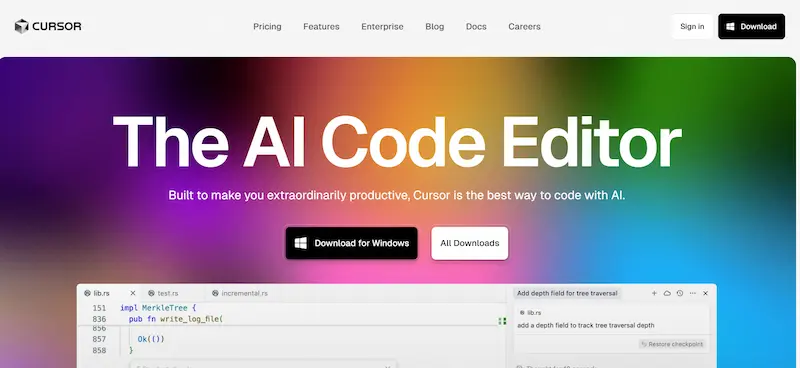
Cursor is a professional, AI-powered code editor built on a Visual Studio Code (VS Code) foundation. It is an AI-first IDE that integrates artificial intelligence directly into the developer’s workflow.
Core Concept and Target Audience
Cursor’s core concept is to augment, not replace, the developer. Developers created this tool specifically for other developers. Its target audience consists of experienced software engineers, programmers, and technical teams needing fine-grained codebase control.
Cursor’s AI is an intelligent assistant that helps with tasks like intelligent autocompletion, code generation, and refactoring within a familiar IDE environment.
Key Features of the Cursor Platform
- AI-Enhanced Code Editor: Cursor takes the familiar VS Code interface and supercharges it with AI. This provides features like multi-line autocompletion and intelligent code generation that understand your project context. This makes it an excellent tool for a Lovable vs Cursor Python workflow.
- Inline Refactoring: One of Cursor’s most powerful features is its ability to refactor code in real time. You can select a code block and prompt the AI to improve it, convert it to another language, or optimize its performance.
- Context-Aware Agents: Cursor’s agent mode is highly context-aware. It can read your entire codebase and understand the relationships between files and functions. This allows you to ask the AI to perform complex, multi-step tasks, such as finding and fixing a bug across several files.
- Local AI Agents: Cursor allows teams that require strict privacy to use local AI models. This ensures that sensitive code never leaves your computer, a significant selling point for enterprise-level security.
Further Reading: How AI Revolutionizes WordPress Development
Learning Curve and Ecosystem
The learning curve for Cursor is moderate. It assumes you are already familiar with a code editor like VS Code. However, it can significantly boost your productivity once you grasp its AI-powered commands and workflows.
The platform inherits the vast ecosystem of VS Code, meaning you can continue to use your favorite extensions and keybindings. This extensibility is a key differentiator when comparing Lovable vs Replit and other integrated environments.
Pricing and Plans
Cursor offers a free hobby plan that includes limited AI requests. Paid plans charge individuals monthly, and teams are billed per user. The plans grant access to more powerful AI models and increased AI requests.
The value proposition of having a powerful AI assistant at their fingertips is significant for developers and teams deeply embedded in their coding environment.
Explore Further: Can Lovable Make Mobile Apps? Full Guide to Turning Web Apps into Native Apps
Side-by-Side Comparison: Lovable vs Cursor
The main difference between these two platforms lies in their workflows.

Workflow and User Experience
- Lovable: The user experience is conversational and visual. You describe your desired app in a chat, and Lovable generates a working version. You then use a visual editor to make changes. It’s a holistic, no-code-first workflow.
- Cursor: The workflow is code-first and iterative. You are in your familiar IDE, and the AI assists you with code generation, completion, and refactoring on demand. It is an enhancement to a traditional coding process.
Lovable’s conversational approach is more intuitive for beginners who want to see their ideas come to life quickly. It creates a complete product from a prompt, which can be an incredibly satisfying and fast experience.
Also Read: Learn How to Create AI Images for Your WordPress Website
Control and Customization
- Lovable: It provides a high level of abstraction, offering less granular control. The platform enables rapid development, allowing you to edit the generated code and use GitHub to enhance it further.
- Cursor: It gives you maximum control. As a developer, you are always in the driver’s seat. The AI’s suggestions and generations are just that, suggestions. You control what code gets included, allowing for precise fine-tuning.
Integration and Extensibility
- Lovable: The platform has built-in integrations for popular tools like Supabase and GitHub. It’s a self-contained ecosystem that handles a significant portion of your development pipeline.
- Cursor’s strength lies in its extensibility. Built on VS Code, it seamlessly integrates with thousands of existing extensions, making it easy to incorporate into any existing toolchain, from project management to testing frameworks.
Discover More: Builder.io Vs Lovable: Head-to-Head Comparison
How They Stack Up Against the Competition
Understanding Lovable vs Cursor is also about understanding the broader ecosystem. Here is a brief look at how they compare to other prominent players.
Lovable vs Cursor vs Replit
Replit is a cloud-based IDE that combines a coding environment with AI-powered features. While it is code-first like Cursor, it has a more collaborative, all-in-one feel that is often more approachable for learners. This approach strikes a balance between the conversational ease of Lovable and the professional depth of Cursor.
Lovable vs Cursor vs Bolt
Bolt is a no-code AI app builder that focuses on creating dashboards and internal tools. It shares Lovable’s philosophy, using a conversational interface to build applications without writing code. The key difference often lies in the specific applications they serve best. The choice between Lovable, Cursor, and Bolt ultimately depends on your project’s unique needs.
Lovable vs Cursor vs Windsurf
Windsurf is an AI-powered development environment that helps developers achieve a “flow state.” Its AI predicts your next moves and proactively solves problems before encountering them. While it shares Cursor’s code-first approach, Windsurf takes “agentic” development a step further.
Lovable vs Replit
Lovable excels at fast, visual prototyping for non-technical users. Its one-click deployment and focus on UI generation make it perfect for validating an idea. Replit is a better fit for those who want to start with a cloud-based IDE and gradually incorporate AI while having direct access to their codebase.
Related: Replit vs Lovable: Which AI Development Platform Is Right for You
Use Case Scenarios: Who Should Choose Which?
The best way to choose between the two is to consider your role and project.
For Beginners and Non-Technical Users
Lovable is the clear winner if you are a founder with a great idea but no coding experience, or a product manager who needs to create a clickable prototype quickly. Its conversational interface and one-click deployment allow you to turn your vision into a real product quickly. It’s an excellent way to prove a concept without a technical team.
For Developers and Technical Teams
For experienced developers and engineering teams, Cursor is a superior choice. Its deep integration with a familiar IDE and its powerful context-aware AI make it a valuable productivity tool. It helps you write code faster, refactor confidently, and understand complex codebases more easily.
The Hybrid Approach
The discussion of Lovable vs Cursor isn’t always a binary choice. Many teams can benefit from a hybrid approach. You could use Lovable to quickly generate a front-end and a basic back-end for an MVP. Then, you could use Lovable’s GitHub integration to export the code.
From there, a developer could open the project in Cursor to add custom features, optimize the code, and scale the application. This strategy leverages Lovable’s speed with Cursor’s power and control.
Further Reading: WordPress vs Lovable Website Builder: A Detailed Comparison
Conclusion: Making Your Final Decision
Ultimately, the choice between Lovable vs Cursor is not about which platform is inherently superior. It’s about which platform suits your specific goals and skill level.
- Choose Lovable if you are a non-technical founder, a designer, or a team that needs to validate an idea quickly. Its conversational interface and one-click deployment make it the fastest path from an idea to a live application.
- Choose Cursor if you are a developer, a technical team, or someone who needs granular control over every line of code. It is a powerful assistant that will make you a more productive and efficient coder.
You might even find that using both platforms in a hybrid workflow provides the ultimate solution, leveraging Lovable’s speed for initial creation and Cursor’s power for professional refinement. The new era of AI development is here, and both Lovable and Cursor are excellent tools for building the future.
FAQs About Lovable vs Cursor
Is there anything better than Lovable?
“Better” depends on your needs. Lovable is a top-tier choice for rapid prototyping and no-code app generation. However, a professional IDE like Cursor or other low-code platforms might be a better fit for deep customization and fine-tuned control over your codebase.
Which AI tool is better than Cursor?
The debate over which AI tool is “better” than Cursor often centers on specific workflows. Tools like Replit and Windsurf are strong competitors, each with a unique approach to AI-powered coding. The best choice comes down to personal preference, project requirements, and whether you prefer an assistant that works with you or an agent that works for you.
Is Cursor the best AI coder?
Cursor is considered one of the best AI-first code editors available today, especially for developers who want to stay within a familiar IDE. Its ability to understand your entire codebase context is a significant advantage over many other tools. However, other platforms like Replit and even AI plugins for traditional editors can be strong contenders depending on the user’s specific needs.
What’s better, Lovable or Replit?
Lovable is better for non-technical users and designers who need to go from idea to a working app in record time. Replit, while also great for rapid development, is more suitable for users who want a cloud-based coding environment and are comfortable with a code-first approach.
How much does Lovable cost?
Lovable offers a free plan for basic usage. It’s paid plans start at an affordable monthly price, and their credit-based system makes it easy to understand your usage. Pricing scales up for teams and enterprises, offering more credits, advanced features, and additional support.