
You open your inbox and see the dreaded message of Spamhaus email blocks. Customers start reporting missing password reset links. Order confirmations never arrive. Contact form messages disappear without a trace.
Your WordPress site’s email system has essentially stopped working. With every blocked message, potential revenue slips away and customer trust takes a hit. What feels like a small technical issue quickly becomes a serious business problem.
When Spamhaus blocks your emails, it usually points to something deeper than a simple setup mistake. In many cases, a compromised WordPress site is being used to send spam behind the scenes.
This guide explains how to identify the root cause, clean your site, fix email delivery, and put safeguards in place so your emails reach inboxes again and stay there.
TL;DR: Spamhaus Email Blocks and Fixes
- Spamhaus blocks usually indicate malware, misconfiguration, or abusive email behavior.
- WordPress sites are frequent targets because attackers exploit outdated plugins, weak passwords, and vulnerable core files.
- Confirm Spamhaus blocking using the Spamhaus lookup tool, bounce messages, and deliverability testing tools.
- Scan your WordPress site for malware and hidden backdoors immediately.
- Remove all malicious code before attempting delisting.
- Switch WordPress email to authenticated SMTP with a trusted provider.
- Configure SPF, DKIM, and DMARC records for proper email authentication.
- Harden WordPress security with firewalls, two-factor authentication, and regular scans.
- Update WordPress core, plugins, and themes consistently.
- Reset all passwords and remove unused plugins and themes.
- Submit a delisting request only after fixing the root cause.
- If blocks return, investigate deeper reinfection or consider professional security help.
- Ongoing monitoring and prevention are easier than repeated recovery.
What is Spamhaus and Why Does it Block Emails?
Spamhaus is a global anti-spam organization that maintains some of the most widely used email blocklists on the internet.
These lists help protect billions of inboxes by identifying IP addresses and domains associated with spam, malware, or abusive email behavior.
When your server appears on a Spamhaus blocklist, many email providers automatically reject your messages, causing legitimate emails to fail.
Spamhaus operates several major blocklists, including SBL for known spam sources, XBL for compromised machines sending spam, and PBL for IP addresses that should not send mail directly. Mail servers check these lists in real time before accepting email.
WordPress sites are frequent targets because attackers exploit outdated plugins, weak passwords, or vulnerable core files to inject spam-sending scripts. Once infected, your server can quietly send thousands of spam messages.
The result is immediate business disruption. Order confirmations, password resets, and contact form emails stop working, damaging customer trust and hurting revenue.
Why Spamhaus Might Be Blocking Your WordPress Emails?
Spamhaus does not randomly block servers without cause or evidence of problematic email activity.
Their sophisticated monitoring systems analyze multiple factors including email volume patterns, recipient complaints, server security configurations, and authentication protocols before adding IPs to their blocklists.
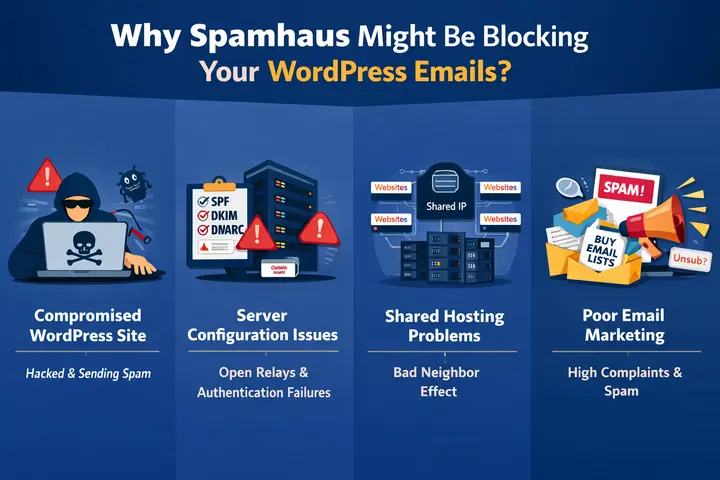
Compromised WordPress Installation
A hacked WordPress site is the most common reason for Spamhaus blocks. Attackers exploit vulnerable plugins, themes, or core files to inject hidden spam scripts.
These scripts quietly send large volumes of spam without your knowledge, turning your server into part of a botnet and quickly damaging your sending reputation.
Server Configuration Problems
Misconfigured mail servers make it easy for spammers to abuse your system. Open relays or missing SPF, DKIM, and DMARC records prevent receiving servers from verifying your emails.
Without proper authentication, even legitimate messages look suspicious, increasing the likelihood of blocklist placement.
Shared Hosting Complications
On shared hosting, many websites use the same IP address. If one site becomes compromised and sends spam, the entire IP can be blocklisted. This bad neighbor effect means your clean site may suffer email blocks due to another user’s security failures.
Poor Email Marketing Practices
Buying email lists, sending sudden bulk campaigns, or lacking unsubscribe options can trigger high complaint rates.
When recipients mark your messages as spam, email providers report your IP for policy violations, which can lead to Spamhaus blocking even without malware present.
Outdated WordPress Software
Outdated WordPress core, plugins, and themes contain known vulnerabilities. Hackers actively scan for these weaknesses and exploit them to inject spam-sending malware. Delaying updates increases your risk of compromise and makes your server an easy target for abuse.
How to Confirm if Spamhaus is Blocking Your WordPress Emails?
Before investing time and resources into fixing a Spamhaus block, you need to verify that Spamhaus is actually the source of your email delivery problems.
Email issues can stem from various sources including DNS misconfigurations, hosting provider limitations, plugin conflicts, or multiple blocklists beyond Spamhaus.
Using the Official Spamhaus Lookup Tool
Start by visiting the Spamhaus Blocklist Checker at spamhaus.org and enter your server IP address or domain.
If you are unsure of your IP, check your hosting control panel or search “what is my IP” while connected to your server.
The lookup tool instantly shows whether you are listed on SBL, XBL, PBL, or other Spamhaus blocklists. It also explains why the listing occurred and when it was added.
Pay close attention to the specific list involved because each one points to a different type of problem. For example, XBL usually signals malware, while SBL indicates spam activity.
Analyzing Email Bounce Messages
Bounce messages are one of the clearest signs of Spamhaus blocking. When WordPress or WooCommerce emails fail, the receiving mail server often returns an error explaining the rejection.
Look for phrases such as “Blocked using Spamhaus XBL,” “IP listed in Spamhaus SBL,” or “listed in zen.spamhaus.org.” These messages usually include your IP address, a reason code, and sometimes a link to Spamhaus for more details.
Save these bounce emails for reference because they help confirm the cause of the issue. They also serve as useful documentation when you request delisting or need to show proof of ongoing problems.
Testing Email Deliverability
Email testing tools like Mail Tester or GlockApps give you a clear picture of your overall email deliverability.
Send a test email from your WordPress site to the address provided by the tool, then review the generated report. You can see whether your messages are landing in spam, failing authentication, or appearing on blocklists.
These tools also check SPF, DKIM, and DMARC records and flag configuration errors.
They often uncover additional problems beyond Spamhaus, such as missing DNS records or weak sender reputation. Regular testing helps you catch issues early and prevent major email disruptions.
Emails Blocked by Spamhaus? Let’s Fix It!
Seahawk Media cleans malware, secures your site, and sets up reliable SMTP so your emails start delivering again.
Step by Step Guide to Fix Spamhaus Email Blocks on WordPress
Once you have confirmed that Spamhaus is blocking your emails, swift and comprehensive action becomes essential to minimize damage to your email reputation and business operations.
The fix requires more than just requesting delisting from Spamhaus because you must address the underlying security issues that triggered the block in the first place.
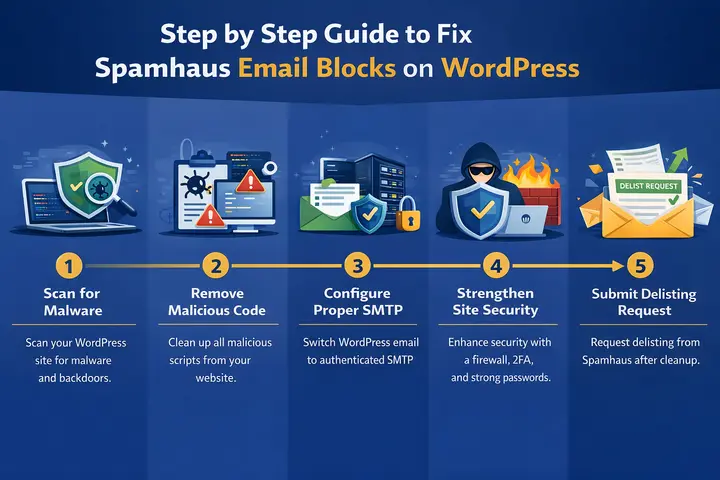
Step 1: Scan Your WordPress Site for Malware
Begin by scanning your entire WordPress installation for malware, backdoors, and spam scripts.
If your IP appears on the Spamhaus XBL, your server is almost certainly compromised and sending emails without your knowledge.
- Use a trusted security plugin to run a full file and database scan. Look for obfuscated code, base64 strings, eval usage, and unexpected PHP files inside uploads or cache folders.
- If you have FTP or SSH access, manually review recently modified files you did not change yourself. Pay close attention to wp-content directories and unknown folders.
Save the scan report and note infected file locations. You will need this information for cleanup and future verification.
Step 2: Remove All Malicious Code
Do not attempt delisting until every infection is removed. Partial cleanup leaves hidden backdoors that allow attackers to return and restart spam activity.
- Use a malware removal tool or service to clean infected files and restore altered WordPress core files. Always keep a backup before cleaning.
- If you clean manually, delete malicious scripts, replace corrupted files with clean copies, and inspect the database for injected code.
After cleanup, run a second scan to confirm the site is fully clean. Remove unused plugins and themes since inactive code can still be exploited.
Step 3: Configure Proper SMTP for WordPress
Stop using PHP mail and switch WordPress to authenticated SMTP. This ensures emails are sent through a trusted channel.
- Choose a transactional email provider such as SendGrid, Mailgun, Amazon SES, or Google Workspace. These services maintain strong sending reputations.
- Install an SMTP plugin and connect it using API keys or SMTP credentials. Set the From email to an address on your own domain.
Send test emails and confirm they arrive in the inbox. Check headers to verify SPF and DKIM authentication passes.
Step 4: Strengthen Your WordPress Security
Install a full security plugin that includes firewall protection, malware scanning, and file change monitoring.
- Enable two factor authentication for admin users and limit login attempts. Add CAPTCHA to reduce automated attacks.
- Update WordPress core, plugins, and themes immediately. Delete anything you are not actively using.
Reset all passwords including WordPress admin, hosting, FTP, database, and email accounts. Use strong unique passwords.
Step 5: Submit a Delisting Request to Spamhaus
After cleaning and securing your site, visit the Spamhaus lookup and removal page. Enter your IP address to check your listing.
- Follow the instructions for the specific blocklist where you appear. Some lists delist automatically after spam stops.
- If a form is required, explain what caused the issue and what you fixed. Be honest and detailed.
Avoid sending mail directly from your server while waiting. Monitor your status until your IP is removed.
What to Do if Problems Continue After Delisting?
If your delisting request gets denied or your IP becomes blocked again shortly after successful removal, you likely have deeper unresolved security issues that require additional investigation and remediation.
Persistent Spamhaus blocks indicate ongoing spam activity or security vulnerabilities.
Handling Denied Delisting Requests
If your Spamhaus removal request is denied, review their response carefully.
Spamhaus usually shares specific details about continued sending spam, policy violations, or unresolved security risks tied to your IP address or domain.
These notes help you understand exactly why your server remains listed on their dns blocklists.
Collect solid proof that the issue is fixed. This may include clean malware scan reports, server logs showing no outbound bulk email, screenshots of new email protection settings, and records of changes made to your email infrastructure.
Send this documentation to Spamhaus support with a clear explanation of your remediation process and the steps you followed.
Investigating Persistent Reinfection
If your site gets blocked again soon after delisting, it usually means hidden backdoors still exist. Some malware survives initial cleanup and quietly restores access, damaging your ip and domain reputation.
Run scans with multiple security tools, since each scanner detects threats differently. Review server logs for suspicious activity, unknown file edits, or repeated login attempts. These clues help identify ongoing compromise.
For complex cases, professional WordPress malware removal services like the one provided by Seahawk Media can perform deeper forensic analysis and remove threats that automated tools may miss, reducing future spamhaus listing risk.
Addressing False Positive Situations
In rare cases, a Spamhaus block is a false positive. This may happen if your IP was previously owned by another company or inherited a poor domain reputation.
Gather evidence showing your legitimate email practices, opt-in lists, low complaint rates, and proper authentication headers. Submit a formal appeal through Spamhaus with these details.
Be patient and thorough. Clear documentation improves your chances of removal and helps protect your long-term sending reputation while keeping your email infrastructure costs under control.
Preventing Future Spamhaus Blocks on Your WordPress Site
Recovering from a Spamhaus block teaches valuable lessons about WordPress security and email deliverability, but the real goal is preventing these blocks from ever happening again.
Proactive security measures cost far less in time, money, and stress than repeatedly dealing with compromised sites.
Implementing Automated Security Monitoring
Configure daily automated malware scans so infections are detected quickly. Enable real-time alerts for file changes, suspicious logins, and malware signatures.
Review weekly security reports to track blocked attacks and vulnerabilities. Early detection limits damage and prevents spam activity from reaching levels that trigger blocklists.
Maintaining Regular Update Schedules
Create a routine for updating WordPress core, plugins, and themes. Test major updates in staging before pushing live.
Consider professional maintenance services to handle updates safely. Staying current closes known vulnerabilities and reduces the chances of attackers exploiting outdated software.
Choosing Quality Hosting Providers
Use hosts that offer firewalls, malware scanning, automatic backups, and active monitoring. Managed WordPress hosts often stop attacks before they reach your site.
Avoid overcrowded budget hosting with weak security controls. Strong hosting security dramatically lowers the risk of large-scale compromise.
Educating Team Members
Train users to recognize phishing, use strong passwords, and avoid suspicious plugins or downloads. Limit permissions based on roles.
Enforce two-factor authentication and prohibit password sharing. Human awareness reduces the most common entry point for WordPress security breaches.
Monitoring Email Deliverability
Track inbox placement, bounce rates, and spam complaints using deliverability tools. Check your IP against major blocklists regularly.
Subscribe to feedback loops from email providers. Early visibility into problems helps you correct issues before emails start getting blocked.
Final Thoughts on Resolving Spamhaus Email Blocks
Spamhaus email blocks are stressful, but they are fixable with the right approach. Once you remove malware, secure your site, and configure SMTP correctly, most email delivery issues can be resolved.
The biggest takeaway is that prevention is far easier than recovery. Regular updates, strong security, and proper email configuration reduce the risk of future blocks.
If you want expert help handling cleanup, security hardening, and ongoing monitoring, professional WordPress maintenance services can save time and prevent repeat incidents.
FAQs About Spamhaus Email Blocks
How do I know if my WordPress site is sending spam?
Common signs include Spamhaus alerts, bounce messages mentioning blocklists, customers missing emails, and unusual spikes in outgoing mail volume. Check server logs and run malware scans to look for mail-sending scripts or compromised plugins.
Do I need technical expertise to fix Spamhaus blocks?
Basic WordPress skills are often enough when using security plugins and SMTP tools. However, complex infections and server-level issues may require professional help.
If automated tools fail or you feel unsure, hiring WordPress security specialists ensures thorough cleanup and proper configuration.
Can I prevent Spamhaus blocks on shared hosting?
Shared hosting increases risk because many sites use the same IP. You can reduce exposure by securing your own site, running regular scans, updating software, and using a dedicated SMTP service.
For critical sites, upgrading to VPS or managed hosting with a dedicated IP provides stronger protection.
Will changing my IP address fix the Spamhaus block?
No. Changing your IP only hides the symptom and does not fix the cause. If malware or misconfigurations remain, the new IP will be blocked as well.
Hosting providers may even refuse IP changes for this reason. Proper cleanup, security hardening, and authentication setup are required first.
How long does it take to get removed from Spamhaus blocklists?
Removal time depends on the blocklist. XBL listings often clear automatically within 24 to 48 hours after spam activity fully stops.
SBL listings usually require manual review and can take several days. During this period, you must not send email from the server. Continued activity can delay or prevent delisting.



