
Some websites prioritize clean, distraction-free layouts, while others use animations and transitions to create immersive experiences. This leads to a key decision in WordPress development: Static UI vs Motion UI.
Each approach offers unique advantages, but the wrong choice can impact performance, accessibility, and SEO. So, which one fits your project?
This guide compares both, outlining their benefits and practical use cases. Designed for WordPress developers, designers, marketers, and business owners, this guide will help you enhance user experience and conversions, whether you’re building a blog, SaaS platform, or eCommerce store.
TL;DR: Static or Motion UI in Web Development
- Static UI prioritizes speed, clarity, and accessibility, making it ideal for content-heavy and performance-focused websites.
- Motion UI enhances engagement by guiding user behavior and adding visual depth to interactions.
- However, excessive animation can negatively impact performance and usability. Therefore, a balanced approach works best.
- Use a strong static foundation with purposeful motion in key areas. This improves interaction, conversions, and overall user experience without harming speed or SEO.
What is Static UI?
Static UI is an interface design approach in which elements remain fixed, with minimal or no animations, ensuring a stable, predictable user experience.
Static web design is the right choice for:
- Content-Heavy Websites: If your primary goal is delivering information, such as blogs, news sites, or educational portals, static UI ensures users can consume content without distraction.
- Performance-Critical Applications: Static UI is ideal for platforms where speed is non-negotiable, such as financial dashboards or enterprise tools.
- Accessibility-First Projects: For users sensitive to motion or who rely on assistive technologies, a static UI offers a more inclusive, predictable experience.
What is Motion UI?
Motion UI is an interface design approach that uses animations, transitions, and dynamic effects to enhance interactivity and guide user behavior.
Motion UI is ideal for:
- Enhancing User Engagement: Motion UI is ideal when your primary goal is to capture attention and keep users engaged. Animations such as hover effects, scroll reveals, and dynamic transitions make interfaces feel interactive and lively. As a result, users are more likely to explore content and spend more time on your site.
- Guiding User Behavior: It also helps direct users toward key actions. Subtle animations on CTAs, forms, or navigation elements provide visual cues, making journeys more intuitive and reducing decision-making friction.
- Simplifying Complex Interactions: Motion UI is effective for breaking down complex processes. Through visual feedback and transitions, users can better understand workflows without feeling overwhelmed.
From an engagement and SEO perspective, Motion UI in web development can help:
- Improve Conversion: Motion UI can significantly enhance conversions by guiding user attention. For instance, subtle hover effects on CTAs or animated progress indicators encourage users to take action without friction.
- Increase Time-on-Page: Animations naturally hold user attention longer. Scroll-triggered reveals and transitions create a sense of progression, encouraging users to explore more content.
Note: Although animations don’t directly impact rankings, they influence key behavioral metrics such as:
- Lower bounce rate
- Higher dwell time
- Improved interaction rates
These signals indirectly support better SEO performance, especially when combined with fast loading speeds.
Static UI vs Motion UI in Web Development: Quick Comparison
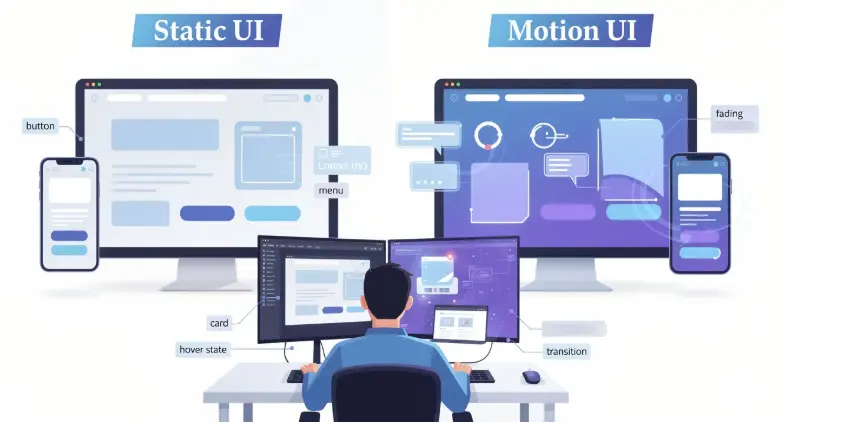
Let’s now compare Static and Motion UI across usability, performance, engagement, and accessibility to determine the best approach for your WordPress website goals.
Clarity vs Interactivity
Static interfaces present information in a straightforward, distraction-free manner. Users can scan and consume content quickly without visual interruptions. This makes it best for clarity-driven, content-focused experiences.
On the other hand, motion enhances interactivity by providing visual cues such as hover effects and transitions. Thus, making the interface feel more responsive and engaging. This makes it ideal for engagement and guided navigation.
Performance vs Visual Experience
Static designs load faster because they rely on minimal scripts and assets. This makes them highly suitable for performance-critical applications.
Conversely, motion-rich interfaces deliver a visually appealing experience. However, without optimization, animations can impact load times and responsiveness.
Simplicity vs Engagement Depth
Static UI focuses on simplicity and ease of use. It reduces cognitive load, making it ideal for users who want quick, straightforward information.
In contrast, Motion UI enhances engagement by encouraging deeper interaction. It guides users through layered experiences, making interfaces more immersive and better suited to exploratory journeys.
Accessibility vs Dynamic Feedback
Static interfaces are more accessible to users sensitive to motion or who rely on assistive technologies. They also offer a consistent, predictable experience, making them a preferred choice for accessibility-first projects.
Meanwhile, motion UI provides instant feedback, such as button responses or loading indicators, improving usability when implemented with accessibility considerations, such as reduced-motion settings.
Load Speed vs Animation Complexity
Static UI loads faster because it has fewer assets. Static pages also have fewer dependencies, resulting in faster rendering and better Core Web Vitals performance. Therefore, it is best for maintaining optimal load speed.
Motion UI involves complex animations that can increase page weight and require performance optimization. However, animation complexity can enhance the user experience when optimized with techniques such as lazy loading and efficient scripting.
How Seahawk Media Can Help with Motion UI on Your WordPress Website?
We help you implement Motion UI strategically to boost engagement, improve conversions, and maintain performance across your WordPress website with a structured, results-driven approach.
- Firstly, we identify where motion adds real value. We focus on key user journeys, such as CTAs and onboarding, while avoiding unnecessary distractions.
- Next, we design and develop animations tailored to your brand. This includes micro-interactions, smooth transitions, and responsive motion across all devices.
- We also ensure animations do not impact speed or SEO. We optimize scripts, use lazy loading, and test performance across browsers and devices.
Finally, we continuously improve motion based on real data. We track engagement, run A/B tests, and refine animations to maximize results.
Elevate Your WordPress Website with Motion UI
Let’s transform your website with strategic motion that drives engagement, improves user experience, and boosts conversions.
Steps to Implement Motion UI in WordPress
Follow this structured approach to effectively integrate Motion UI into WordPress. This will ensure performance, scalability, and consistency across design, development, and content workflows.
Step 1: Development Workflow for Motion Features
Firstly, begin by identifying where motion adds real value, such as onboarding flows, CTAs, or key interactions that influence user behavior.
- Design motion prototypes to visualize interactions early.
- Choose appropriate libraries based on complexity.
- Implement animations in phases to reduce risk.
- Test thoroughly across devices and browsers.
Step 2: Server and Caching Checks Before Rollout
Next, ensure your infrastructure can support motion-heavy elements without compromising speed or stability.
- Use reliable hosting such as Bluehost, hosting.com, and InMotion with fast response times.
- Enable page and object caching for efficiency.
- Integrate a CDN for faster global content delivery.
Step 3: Code Splitting and Deferred Scripts
Additionally, optimize how animation assets are loaded to maintain strong performance and avoid unnecessary resource consumption.
- Load scripts only on pages where needed.
- Defer non-critical JavaScript to improve load time.
- Avoid bundling large animation libraries globally.
Step 4: Documenting Motion Specs in CMS
Finally, maintain consistency by clearly documenting motion guidelines within your CMS for both developers and content teams.
- Define animation triggers and behaviors.
- Standardize duration and easing values.
- Outline use cases for each motion type.
This ensures alignment, scalability, and a consistent user experience across the website.
Tools and Libraries for Animated Websites on WordPress
Choose the right tools and libraries to create smooth, high-performing animations in WordPress while maintaining scalability, flexibility, and optimal website performance.
Recommended Tools
Selecting the right animation tools ensures better control, performance, and scalability for motion-driven experiences.
- GSAP (GreenSock Animation Platform): Ideal for building complex, high-performance animations with precise control.
- Lottie: Perfect for lightweight, scalable vector animations without heavy file sizes.
- Scroll-trigger libraries: Enable dynamic, scroll-based storytelling and interactive user journeys.
WordPress Plugins to Evaluate
Next, leverage WordPress-specific tools to simplify implementation while maintaining flexibility and performance.
- Motion-enabled page builders for faster design workflows.
- Animation add-ons for Elementor or Gutenberg for enhanced UI effects.
Finally, always test plugins for performance impact before full deployment to ensure animations do not slow down your website.
Leveraging Motion UI for Engagement, Performance, and Conversions
Use Motion UI strategically to guide users, strengthen brand identity, and optimize performance while ensuring accessibility and measurable improvements in engagement and conversions.
Designing Motion for User Guidance and Experience
Motion design plays a critical role in guiding users through your website while enhancing overall usability and interaction clarity.
- Incorporating Motion Design to Guide Users: Motion helps direct attention to key areas such as CTAs, navigation, and important content. Subtle cues, such as hover effects and transitions, make user journeys more intuitive and seamless.
- Motion That Enhances User Engagement: Micro-interactions, such as button animations or form feedback, create a responsive feel. This encourages users to interact more, improving engagement and satisfaction.
Building Scalable Motion Systems for Brand and Performance
Next, combining design systems with performance best practices ensures motion remains consistent, scalable, and aligned with your brand goals.
- Advanced Animations and Design Systems: Define animation standards, including duration, easing, and triggers. Reusable motion components ensure consistency across pages and simplify development workflows.
- Animated Websites for Brand Identity and Conversions: Animations can reinforce brand personality while highlighting key conversion elements. When used thoughtfully, motion increases visual appeal without overwhelming users.
Optimizing Motion for Accessibility, SEO, and Growth
Finally, motion must be optimized to support performance, accessibility, and continuous improvement through data-driven decisions.
- Performance, Accessibility, and SEO Considerations: Ensure animations are lightweight and accessible. Use techniques like prefers-reduced-motion, CSS transforms, and lazy loading to maintain speed and inclusivity.
- Measurement and Optimization to Boost User Engagement: Track KPIs such as engagement rate, conversion rate, and time on page. Also, run A/B tests to refine motion strategies and continuously improve results.
Conclusion and Next Steps
Choosing between Static UI and Motion UI is not about picking one over the other; it’s about aligning design decisions with your goals.
Static UI excels in clarity, speed, and accessibility, while Motion UI enhances engagement and storytelling when used strategically.
For most WordPress websites, a hybrid approach works best: keep the foundation static while introducing purposeful motion in key areas.
If you’re unsure where to start, consider booking a free consultation with Seahawk Media to evaluate your current website and identify opportunities for improvement.
As a next step, draft a motion pilot project for high-impact pages, such as your homepage or landing pages. Test, measure, and iterate because the best UI isn’t just designed; it’s continuously optimized.
FAQs About Motion UI in Web Development
What are the latest web design trends related to Motion UI?
Modern web design trends focus on using motion to create engaging user experiences while balancing performance and usability across different devices.
How do CSS animations improve websites?
Well-implemented CSS animations enhance user interaction by providing smooth feedback. This helps users understand actions and transitions more clearly.
Are interactive elements important for engagement?
Yes, interactive elements encourage users to explore web pages, making the experience more engaging and increasing the chances that users interact with key sections.
What are scroll-triggered animations used for?
Scroll-triggered animations activate as users scroll, guiding them through content blocks and drawing attention to important sections without overwhelming them.
Can too many animations affect performance?
Yes, too many animations or heavy animations can slow down devices, negatively impacting usability and making users feel frustrated.
How does Motion UI impact SEO and search engines?
Motion effects can improve user engagement, which, in turn, benefits search engine rankings by increasing time on page and reducing bounce rates.
Should I choose a static layout or a motion-based design?
A static layout works best for static content and performance, while subtle motion adds visual interest and helps guide users without overloading the animation.



