
Odoo and WordPress are both powerful platforms, but they are built for completely different purposes, and choosing the wrong one for your business can cost you time, money, and growth opportunities. Comparing Odoo to WordPress is like comparing a Swiss Army knife to a chef’s knife. One does many things in a single package. The other does one thing exceptionally well. Neither is objectively better; it depends entirely on what you need.
This guide breaks down every meaningful difference between Odoo and WordPress in 2026 so you can make a confident, informed decision for your specific situation.
WordPress wins overall for most users because of its flexibility, lower cost of entry, and stronger SEO capabilities. Odoo is the better choice for businesses that prioritize operations, automation, and deep system integration over marketing flexibility.
If your primary goal is building a website, ranking in search, and growing through content and marketing, WordPress is the better platform.
If your goal is managing inventory, automating workflows, connecting your website with CRM and accounting in real time, and running operations from one system, Odoo is the stronger choice. Read on for the full breakdown.
What is Odoo?
Odoo is an all-in-one ERP platform designed to manage business operations end-to-end, including CRM, accounting, inventory, HR, marketing, and e-commerce within a single system. As of recent estimates, Odoo has over 184,000 users worldwide, ranging from small businesses to large enterprises. Its strength lies in consolidating multiple business functions into one unified platform.
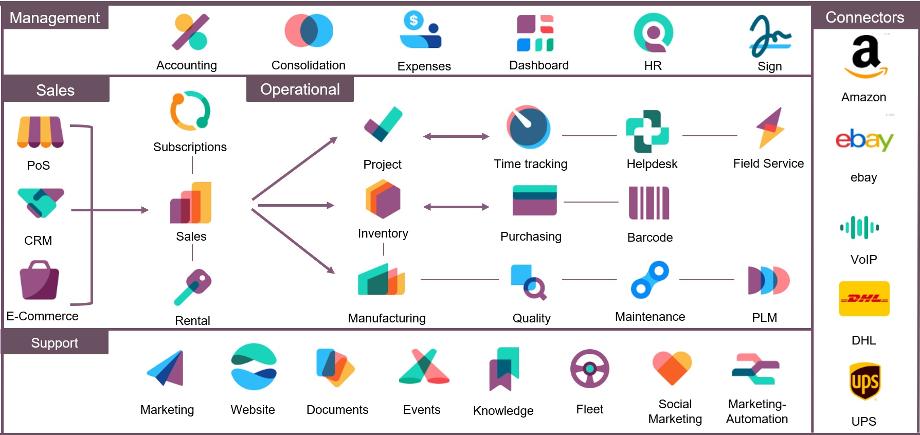
Odoo adopts an ERP vision: it does not simply display pages; it orchestrates complex data flows between your different departments. An order placed on your website does not just generate a notification: it updates inventory, creates an invoice, triggers shipping, and feeds the CRM, all without any manual intervention.
What is WordPress?
WordPress began as a blogging platform in 2003 and has since grown into the most widely used content management system in the world, powering over 43% of all websites on the internet. Its strength is not in running business operations but in helping you build, publish, and market content at scale with total design flexibility.

WordPress was built for content. Blogging, long-form articles, landing pages, and content marketing are its home turf. The block editor, known as Gutenberg, is mature, flexible, and designed for non-technical users who need to publish without calling a developer. SEO on WordPress is a solved problem. Rank Math, Yoast, and similar plugins give you real-time on-page analysis, schema markup, XML sitemaps, and fine-grained control over every meta tag.
Already Know WordPress is Right for You?
Seahawk Media builds high-performing WordPress websites that rank, convert, and scale with your business. From custom development to ongoing maintenance, we handle everything so you can focus on growth.
Odoo vs WordPress: Side-by-Side Summary Table
| Factor | Odoo | WordPress |
|---|---|---|
| Primary purpose | ERP and business operations | Content management and websites |
| Starting price | $31.10/month | $9.00/month |
| Website design flexibility | Limited themes, lower ceiling | 50,000+ themes, full control |
| SEO capability | Basic, functional | Advanced with Yoast/Rank Math |
| E-commerce | Native ERP integration | WooCommerce plugin |
| Plugin/app ecosystem | Smaller, operations-focused | 60,000+ plugins |
| Learning curve | Steep | Moderate |
| Developer availability | Limited, more expensive | Abundant, all price points |
| Security model | Closed, native | Open, requires active management |
| Best for | Inventory, logistics, ERP-driven business | Content, marketing, SEO-driven business |
Odoo vs WordPress: Head-to-Head Comparison
Here is how the two platforms compare across the criteria that matter most for business decisions in 2026.
Website Building and Design
Odoo offers an intuitive drag-and-drop website builder that lets users create professional sites without coding. The interface is clean, and the output is polished, but the design ceiling is noticeably lower than WordPress’s. Unlike WordPress, which offers 50,000+ themes, Odoo has a limited marketplace, and you often need a developer to make the site look unique.
WordPress has thousands of themes and a mature page builder ecosystem, including Elementor, Beaver Builder, and GenerateBlocks. Whatever design you envision, a WordPress developer can build it. Custom post types, Advanced Custom Fields, and template hierarchy give granular control over every page and content type.
Winner: WordPress for design flexibility and creative control.
E-Commerce Capabilities
This is where Odoo genuinely shines. If you sell physical products and manage inventory, Odoo’s e-commerce module connects your online store directly to the warehouse, accounting, and fulfillment with zero middleware. Product availability reflects real-time warehouse stock with no sync delays and no overselling. An online order automatically creates a sales order, triggers warehouse picking, generates a packing slip, issues an invoice, and updates accounting records without human intervention or third-party integrations.
WordPress and WooCommerce support 100+ payment gateways. Odoo supports 170+ payment providers, and its strength lies in how payments are integrated into the broader system. Transactions are directly tied to invoices and accounting records, enabling automatic reconciliation and real-time financial tracking.
WooCommerce offers incredible flexibility because of its massive market share. There is an extension for virtually every payment gateway, shipping provider, and marketing tool on the planet. However, WooCommerce is ultimately a plugin built on top of a blogging platform. As order volumes scale, managing complex inventory and generating advanced financial reports within the WordPress dashboard becomes cumbersome.
Winner: Odoo for complex operational e-commerce. WordPress with WooCommerce for flexibility and ease of setup at smaller scales.
SEO and Content Marketing
WordPress sites rank well because the platform has had twenty years of search engine optimization baked into its DNA. The SEO plugin ecosystem alone represents thousands of developer-years of work.
Odoo integrates SEO features directly into its website builder, whereas WordPress relies on plugins like Yoast SEO for advanced optimization. WordPress generally offers more comprehensive SEO options due to its larger plugin ecosystem.
Odoo has excellent technical SEO, covering sitemaps, speed, and meta tags, but lacks the granular keyword-scoring tools of Yoast SEO or Rank Math. The blog module works, but it feels like an afterthought compared to WordPress’s content-first design.
Winner: WordPress by a clear margin for SEO and content marketing.
Customization and Flexibility
WordPress has 60,000+ plugins. Need a booking system? There are fifty options. A membership site? Dozens of solutions. An obscure API integration? Someone probably built a plugin for it three years ago. Odoo’s app store has far fewer website-specific options. What exists tends to focus on business operations rather than website features.
For businesses with unique data-collection needs, complex forms, or specialized workflows, Odoo’s modular architecture enables deep customization of business processes. But for website-specific customization, nothing matches the breadth of WordPress’s offerings.
Winner: WordPress for website customization. Odoo for business process customization.
Pricing and Total Cost of Ownership
Odoo starts at $31.10 per month, while WordPress starts at $9.00 per month, based on current 2026 pricing.
The initial cost of a solution never reflects its real long-term cost. WordPress is technically free, but this apparent affordability quickly disappears in the face of accumulating real costs. High-performance hosting, a premium theme, paid plugins required for a serious online store or professional website, and developer interventions for recurring technical issues mean the annual cost of a well-maintained WordPress site is often higher than initially expected at launch.
The Odoo Enterprise model is transparent and predictable: per-user pricing that includes access to all applications, cloud hosting, and regular updates. No unpleasant surprises when software evolves, and no additional costs to access new functionality.
WordPress offers a significantly lower entry cost and a more flexible spending model, making it more affordable for most small to mid-sized businesses. In contrast, Odoo requires a higher upfront investment and charges user-based pricing.
Winner: WordPress for lower entry cost. Odoo for cost predictability at scale.
Learning Curve and User Experience
WordPress requires slightly more effort during initial setup due to its self-hosted nature, but its simpler interface, clearer structure, and lower day-to-day learning curve still make it more accessible than Odoo for most users.
Setting up and configuring Odoo correctly can be difficult and time-consuming, often requiring technical expertise or the services of external consultants. Once properly set up, Odoo’s dashboard gives business users a centralized view of every business function, which is genuinely powerful for operations-heavy teams. But getting there requires significant investment.
Winner: WordPress for ease of use and day-to-day accessibility.
Developer Availability and Support
Finding a WordPress developer is straightforward. They are everywhere, at every price point, in every timezone. Finding an Odoo developer who specializes in the website module is significantly harder and typically costs 30 to 50% more per hour. This matters for ongoing maintenance, not just the initial build.
WordPress also benefits from the world’s largest CMS community, with extensive documentation, forums, video tutorials, and third-party support agencies available globally.
Winner: WordPress for developer availability and support ecosystem.
Security
WordPress’s massive popularity makes it an ideal target for attacks, and its heavy reliance on third-party plugins multiplies the number of vulnerable entry points. Keeping a WordPress site secure requires constant technical vigilance: regular updates, monitoring outdated plugins, and periodic security audits.
Odoo centralizes backup management and adopts a more closed, native security approach. A closed ERP environment structurally limits exposure to external threats, which is particularly relevant for companies handling customer data, financial information, or sensitive trade secrets.
Winner: Odoo for native security architecture. WordPress is perfectly secure when properly maintained, but requires more active management.
Need Help Building Your WordPress Website?
Seahawk Media specializes in WordPress development for businesses that want a site built to rank and convert. Get expert development starting from $129 per hour with no retainer and no long-term contract.
Who Should Choose Odoo?
Odoo is the right choice if your business fits one or more of these profiles:
- You sell physical products and need real-time inventory management connected to your website
- You want your website orders to automatically trigger accounting, invoicing, and warehouse operations without any manual steps or third-party integrations
- You are running a manufacturing, distribution, or logistics business where operational automation matters more than marketing flexibility
- You need CRM, HR, accounting, project management, and your website all inside a single system
- You are a business that sells products, services, or subscriptions and the ability to have your website talk directly to your inventory and accounting is a genuine competitive advantage for your operations
Who Should Choose WordPress?
WordPress is the right choice if your business fits one or more of these profiles:
- Your growth strategy is driven by content marketing, SEO, and organic search traffic
- You need a highly customizable website that can be designed and redesigned without a developer dependency
- You are a startup, small business, or individual looking to minimize upfront costs while maintaining professional quality
- You need access to a wide ecosystem of plugins for booking, membership, ecommerce, email marketing, and more
- You want to hire developers easily and affordably for ongoing maintenance and new features
The Hybrid Approach: Using Both Together
In many cases, the best solution is not choosing one over the other but combining both platforms: using WordPress for customer-facing experiences and Odoo for backend operations. This hybrid model gives businesses the content marketing power and design flexibility of WordPress on the front end while Odoo handles inventory, accounting, CRM, and logistics on the back end. The two platforms can be connected via APIs and middleware tools, though this approach requires more technical setup and ongoing maintenance than using either platform alone.
How Seahawk Media Can Help?
If WordPress is the right platform for your business, Seahawk Media’s WordPress development team can help you build, launch, and maintain a site that performs well in search, converts visitors, and scales with your business. Whether you are starting from scratch or migrating from another platform, including Odoo, our team handles the full development process so you can focus on running your business.
Odoo vs WordPress: The Final Verdict
After an in-depth exploration of Odoo and WordPress, it’s clear that both platforms offer unique strengths tailored to different user needs.
Odoo is an all-in-one business management suite ideal for those who need integrated solutions for CRM, inventory, and e-commerce.
WordPress is a versatile CMS that excels in content creation, customization, and flexibility, making it suitable for a wide range of users, from bloggers to large enterprises.
Ultimately, your choice should align with your specific needs. If managing diverse business operations is your priority, Odoo is the way to go. However, if you’re focused on creating an engaging website with extensive customization options, WordPress is your best bet.
Before making a final decision, consider taking advantage of free trials or demos offered by both platforms. Exploring the interfaces and capabilities firsthand can provide valuable insights that help you choose the right platform for your needs.
FAQs: Odoo vs WordPress
Is Odoo better than WordPress?
Neither platform is universally better. WordPress wins overall for most users due to its flexibility, lower entry cost, and superior SEO capabilities. Odoo is the better choice for businesses that prioritize operations, automation, and system integration over marketing flexibility. The right answer depends entirely on your business model and primary goals.
Can Odoo replace WordPress?
For most content-driven businesses, no. Odoo’s blog module works, but it feels like an afterthought compared to WordPress’s content-first design. If content marketing drives your business, WordPress is the clear choice. Odoo can replace WordPress for businesses where the website is primarily a transactional tool connected to backend operations rather than a content or marketing platform.
Is WordPress free compared to Odoo?
WordPress core software is completely free and open-source, but running a WordPress website involves additional costs, including web hosting, domain registration, premium themes, and plugins. While basic WordPress sites can be very affordable, complex sites with premium plugins and managed hosting can become expensive over time. Odoo offers a free community edition, but advanced features require paid plans starting at $31.10 per month.
Which platform is better for e-commerce?
It depends on your scale and complexity. WooCommerce offers incredible flexibility with extensions for virtually every payment gateway and shipping provider. However, as order volumes scale, managing complex inventory within WordPress becomes cumbersome. Odoo’s native integration eliminates the need to cobble together dozens of premium extensions. For small to mid-sized stores, WordPress with WooCommerce is easier and more affordable. For inventory-heavy or operationally complex businesses, Odoo is stronger.
Which platform is easier to use?
One user noted that they used to spend a few days building a website on WordPress, whereas with Odoo, the initial setup only took a few hours. However, WordPress shines in overall usability for those who need a comprehensive solution for both website building and hosting, and its larger community and resources make it easier to troubleshoot and maintain in the long term.
Can I use Odoo and WordPress together?
Yes. Many businesses use WordPress for their public-facing website and content marketing while running Odoo in the background for operations, CRM, and inventory. The two can be connected via APIs. This hybrid approach is increasingly common for growing businesses that need the strengths of both platforms without being limited by either one alone.
Which platform is better for SEO?
WordPress is significantly stronger for SEO. WordPress sites rank well because the platform has had twenty years of search engine optimization baked into its DNA. The SEO plugin ecosystem alone represents thousands of developer-years of work. Odoo covers the technical basics but cannot match the depth and granularity of WordPress’s SEO tooling.



